SMS Policy
Last updated: September 17, 2026
Program name
Slide Phone Verification, operated by Slide (useslideapp.com).
Who sends the messages
Verification codes are delivered by Firebase Phone Authentication, a Google service, from the Slide app on your device. Slide does not operate a sending number and does not send text messages from its own systems.
This matters for two things below: the exact wording of the message comes from Google, not from us, and replies to the number a code arrives from do not reach Slide.
What we send
One-time passcodes so you can verify that a phone number is yours. These are transactional account-verification messages, sent only when you ask for one.
Slide does not send marketing, promotional, or bulk text messages, and does not sell, share, or transfer phone numbers to third parties for marketing.
Consent language shown in-app (point of opt-in)
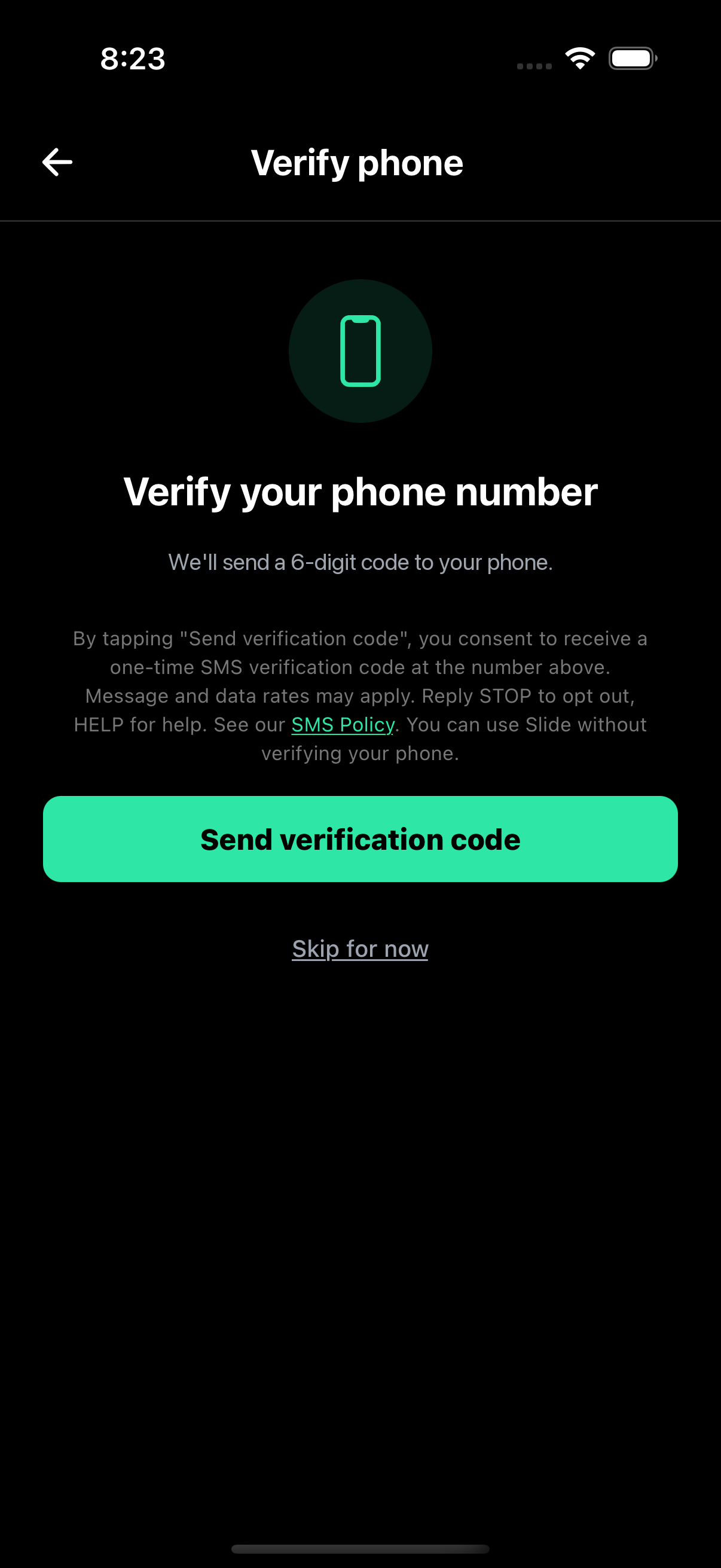
You enter your own phone number in the Slide app and land on a dedicated verification screen. The disclosure below sits directly above the “Send verification code” button. Tapping that button is the opt-in and triggers one verification message to the number you just entered.
Slide never sends a code to a number you have not typed in yourself and confirmed by tapping Send on that screen.
Branded opt-in screen (in-app)
Below is the verification screen exactly as it appears in the Slide app: the phone-number entry, the disclosure, and the “Send verification code” button that carries the opt-in. Recaptured from the shipping build on September 17, 2026.
Is verifying required?
Yes, for new accounts. Verifying a phone number is part of creating a Slide account: it is how we keep one person from holding many accounts, and how a friend who only has your number can find you. Accounts created before this requirement was introduced are not asked to verify.
Verification is the only thing the number is used for at signup. Agreeing to marketing messages is not part of it, because Slide does not send any.
Message frequency
Entirely user-initiated: a code is sent only when you tap Send. Repeated requests for the same number are rate limited by Firebase, which also applies its own per-number and per-device quotas.
Message & data rates
Message and data rates may apply depending on your carrier plan. Carriers are not liable for delayed or undelivered messages.
How to stop receiving codes
Codes only arrive when someone asks for one in the app, so the way to stop receiving them is to stop requesting them. Because the messages are delivered by Firebase rather than from a Slide number, replying to one does not reach us, and Slide cannot answer STOP or HELP on that number.
If codes are arriving at your number and you did not request them, or you want your number removed from an account, email ro@useslideapp.com and we will handle it. You can also change or remove the number on your own account in the app, under Profile, then Edit Profile.
Privacy
A phone number submitted for verification is used to confirm ownership of the number, to secure the account, and to let people who have your number find you on Slide. It is not shared with third parties for marketing. See our Privacy Policy for how long we keep it and how to delete it.
Contact
Rohan Bindu, Sole Proprietor, DBA Slide, California, USA.
Email: ro@useslideapp.com
Website: useslideapp.com